Arrow Block
A 3D puzzle game for phones: 240 levels checked by a solver, a web version in three.js, then a Flutter app with a home-made 3D engine.
In progressGamePersonal project2026
Context
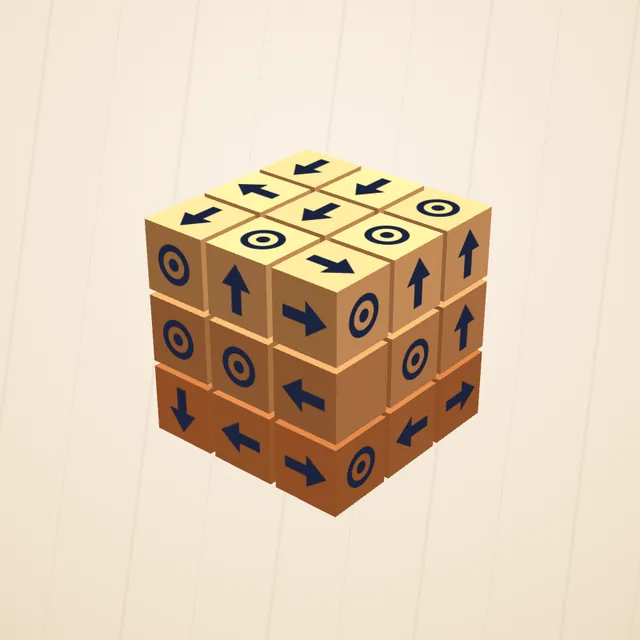
Arrow Block is a personal project, started in 2026 alongside the second year of my BUT degree. It is a 3D puzzle game: a shape made of arrow cubes, which you take apart by launching the cubes in the right order. A cube moves in the direction of its arrow; if it hits another one, the player loses a heart.
The game started as a web page, then headed for phones: first the same page packaged for Android, then a proper app.
Goals
- A complete game: 12 worlds of 20 levels, a daily challenge, a streak, missions and puzzle pieces to collect, with no ads or purchases.
- Levels that can always be solved, with a rising difficulty.
- A smooth app on phones, in 11 languages.
- A playable demo here, built from the same source as the game.
- Finding out what a coding AI can do on a complete project, and learning to use one.
Approach: a project led with AI
I led this project with an artificial intelligence: Claude Opus 5.5, by Anthropic, set to a high reasoning effort, first in conversation and then in Claude Code, an agent that reads the repository, writes the code and runs the tests. It was a deliberate choice: to see how far this technology goes on a real project, from the first game rule to an app on a phone, and to learn to use it now rather than discover it later at work.
The roles were split. The AI wrote most of the code and suggested technical solutions; I decided what the game should be, chose among its proposals and signed off on every step: review, testing on my phone, and rolling back when the result did not suit me.
Working this way takes method:
- a handover document, kept up to date, that the AI reads at the start of every session: decisions made, rules to follow, pitfalls already met;
- rules checked by the machine rather than by trust: a fingerprint of the first 120 levels, a comparison of the JavaScript and Dart versions, tests on the phone;
- real measurements (frames per second, app size) to judge a proposal, rather than the confidence with which it is presented.
What I take from it: AI speeds up writing code enormously, to the point where a student working alone can lead a project of this size, but it does not know what matters for the project, and it can be confidently wrong. The developer’s job is shifting towards specification, architecture, testing and critical review: knowing exactly what you want, and proving you got it. It also raises questions I keep in mind: staying able to understand and take over the code it produces, owning what is shipped, and not mistaking going fast for doing well.
Implementation
Web version
The game is written in JavaScript, without a framework, with three.js for the 3D. The 240 levels are not drawn by hand: a generator builds them from a seed, and a solver checks that each one can be finished. A fingerprint of the first 120 levels, checked by continuous integration, ensures that a change never alters levels people have already played. The music and sound effects are generated by the browser (Web Audio), without any sound file.
The camera frames the shape by itself during play. The first version kept turning and sometimes hid the playable cubes; I rewrote it to cast rays through the grid to measure what the player really sees, and to pick the best view out of 96. Replayed on the 240 levels, it goes from 369 rotations down to 7.
Android app
To get players early, the web version was first packaged for Android with Capacitor. The final app is rewritten in Flutter. Rather than a 3D engine that was still unstable, I wrote my own 3D rendering on Flutter’s canvas: cube projection, back-to-front sorting, lighting and arrows mapped as a texture, all in a single draw call.
The game logic was ported to Dart line by line. Tests compare the 240 levels of both versions field by field: the slightest difference in arithmetic between JavaScript and Dart would change the levels. Both apps share the same save, so players keep their progress when moving from one to the other.
Demo
The demo above is the web version of the game, cut down to three levels and compressed into a single file. It runs in a frame isolated from the page and only talks to it through messages: ready, suggested height, level cleared. It can also be played with a keyboard.
Results
On a Samsung Galaxy S23, the largest level (216 cubes) runs at 120 frames per second, with each frame taking about 2 ms to draw out of the 8 available. The game is translated into 11 languages, and its logic is covered by tests in JavaScript, in Dart and on the phone itself.
Above all, this project taught me to measure before optimizing, to check a rewrite against references rather than by eye, and to work with an AI without handing it my judgment.
My role
- Game design: rules, twelve worlds and their mechanics, progression, missions and a cosmetic-only shop.
- Leading development with an AI (Claude Opus 5.5): instructions, technical choices, review and sign-off of every step.
- Development of the web version, its level generator and its solver.
- Android packaging with Capacitor, then a full rewrite in Flutter.
- Testing and performance measurements on a phone.
Skills used
Develop applications
Level 2 · Go from requirements to a complete application
- AC21.02 Apply accessibility and usability principles
- AC21.04 Check and validate the quality of the application with tests
What I learned
- Working with a coding AI: framing its task, checking what it produces, keeping control of the decisions.
- Writing 3D rendering without an engine: projection, face sorting, lighting and textures done by hand.
- Porting a program from one language to another without changing its output, checked against shared references.
- Measuring an app’s smoothness on a real phone instead of assuming it.
- Keeping a single source for levels and texts, and generating everything else from it.